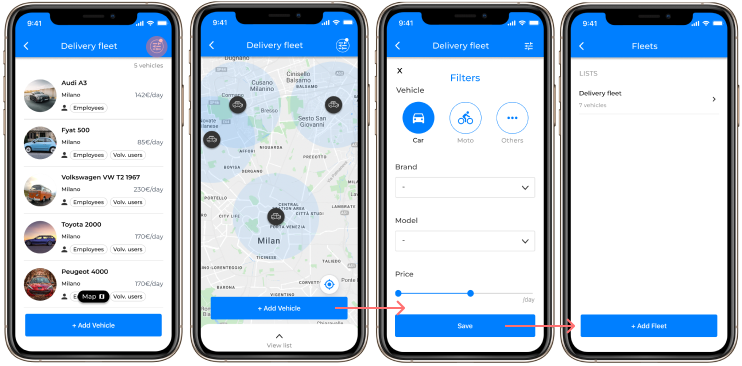
Fleet sharing for companies inside the Volvero app
Volvero is an app for sharing vehicles, which connects owners and drivers in a simple, reliable, and innovative way. I added a feature so users can book vehicles from their company’s fleet, and companies can share and manage that fleet.
What is the challenge?
Imagine that you have a company
and you have a fleet of vehicles.




So with this fleet, you would like to have an app to manage this fleet and be able to share it with the employees of your company.


And moreover, you can let the USERS of Volvero use this fleet.
Add a feature
Letting users book vehicles from their company’s fleet inside an existing mobile app
what consists of
Add functionality to an existing vehicle sharing application. The challenge is to let companies share their fleet of vehicles with their employees and manage it (and optionally add Volvero users). On the other hand, employees (and Volvero users, if available) can view this fleet and reserve one or more vehicles.
goal
This part of the project lets companies create and manage a fleet of vehicles, and lets employees view and reserve them.
TARGET
This project is aimed at companies that have a fleet of vehicles and are interested in sharing them.
Design thinking process

Empathize
Understand the needs
Define
Clarity, Focus, Define user and Categorize
Ideate
Create a user flow ideation to evaluate
Prototype
Look for the best possible solution
Testing
Verify the idea and get feedback
EMPATHIZE
- Meetings with the CEO
- Online surveys
- User testing
Let’s start
Volvero is a real company with its own fleet. They gave this challenge to the bootcamp so students could work with a real client.
My first step was to understand exactly what they wanted to build.
How did I start?
I had regular meetings with Volvero's CEO, who explained what the company needed.
Then I ran online surveys and tested different flows with around 15 people, mostly students, in person and on video calls, to see if they could complete each task on their own.
What did they want?
From the meetings with the CEO and the survey, the first thing companies needed was a way to create lists of their fleet.
Create lists of fleet
On one hand, they wanted to create lists of their fleet.
Customizable and intuitive
On the other hand, they wanted the app to be as customizable and intuitive as possible.
What do they want when creating
fleet lists?
- Create a nameAdd name for fleet
- Add employeesAdd all the employees that the user/company wants to have in DDBB
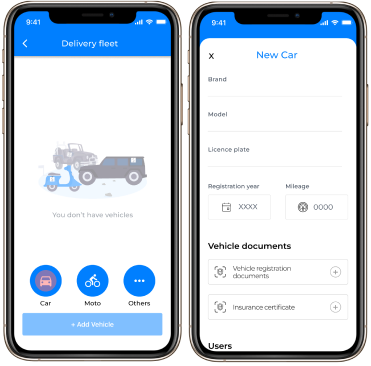
- Add vehiclesAdd all the vehicles the user wants to have in this fleet list
- Select who can book each vehicleSelect the list of employees created previously.
- Share vehicleWho each vehicle can be shared with, employees and/or Volvero’s users
DEFINE
- Persona
- MoSCoW

PERSONA:
Tom is a 34-year-old business owner who has a fleet of vehicles that is hard to manage with his employees.
He wants an app to manage his fleet that is as intuitive as possible.
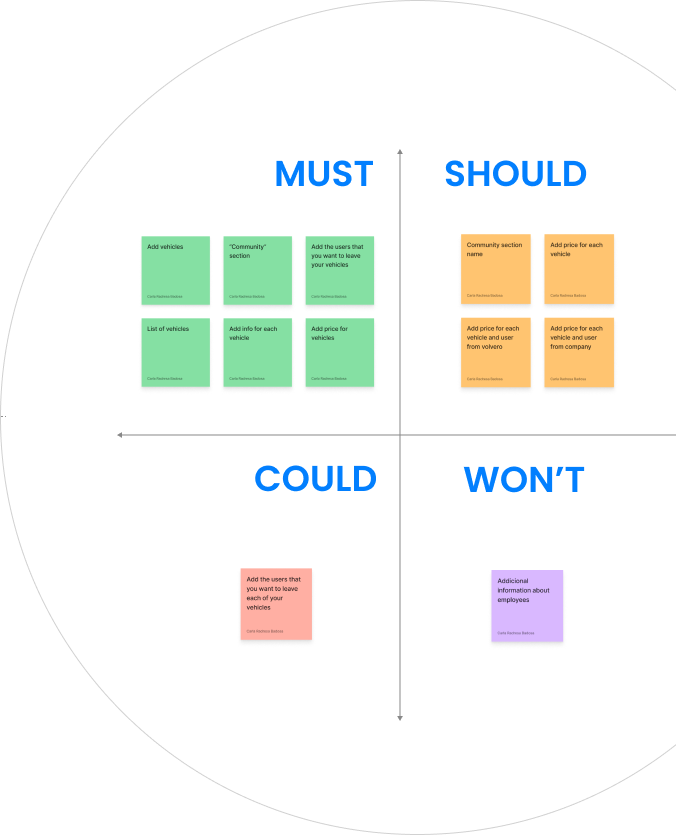
Once I had defined everything users
and businesses needed from the app,
I used MoSCoW to prioritise it
and decide what was essential.
IDEATE
- How Might We
- User Story
- Moodboard
HOW MIGHT WE
... make it easier for companies to lend their fleet of vehicles to users?
This question framed the problem I set out to solve.
USER STORY
As a Company
I want to create communities of employees to share a reserved fleet of vehicles
so that businesses can manage the vehicles
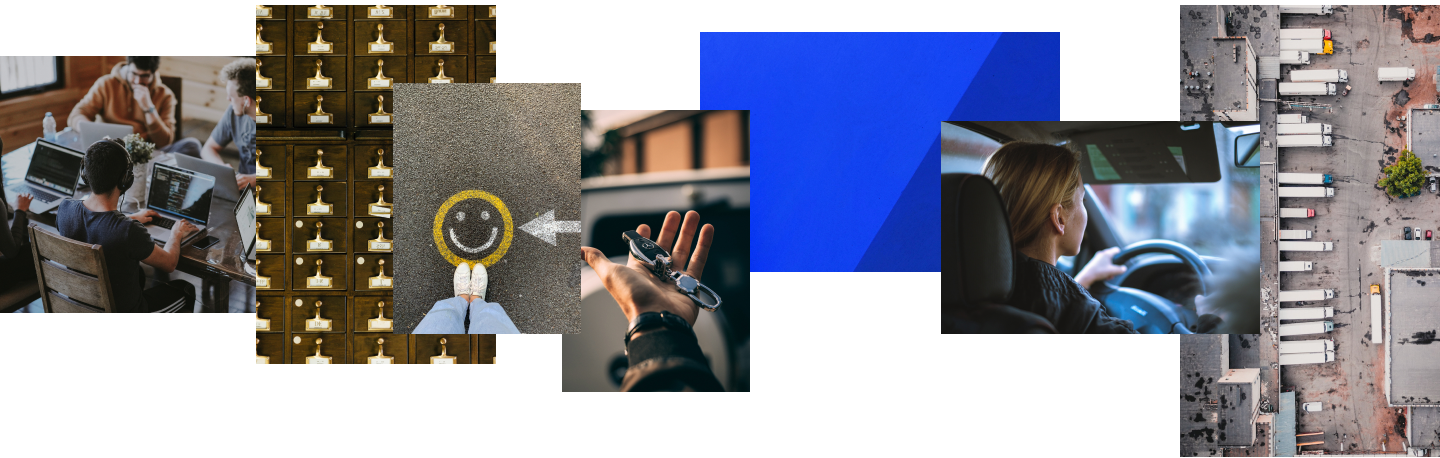
MOODBOARD
PROTOTYPE &
TESTING
- Mid-Fidelity
- Usability testing
- High-Fidelity
- LOW-FIDELITY
- Testing
- MID-FIDELITY
- Testing
- HI-FIDELITY
- Testing
- FINAL PRODUCT
Style guide
I kept it as similar as possible to the current app, so the new feature does not feel like a separate product
Mid-fidelity VS High-fidelity
These are the screens that changed the most from mid-fi to hi-fi, based on what I learned from testing with around 15 users.
PROFILE
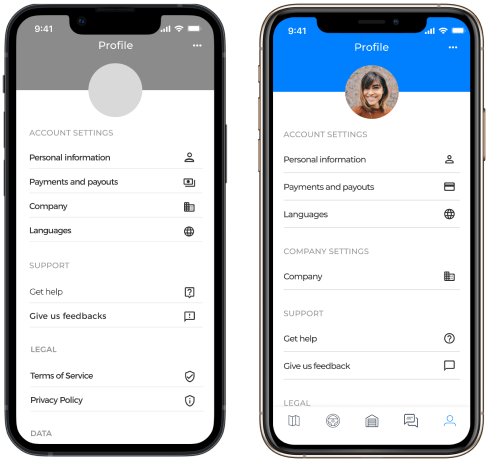
ProblemUsers couldn’t find the company inside their profile.
ChangeThe company now has its own section, separate from the personal account.
After testing, I saw how hard it was for users to find the company section.
So I moved it to its own section, separate from the personal account, which made it more intuitive.
company section
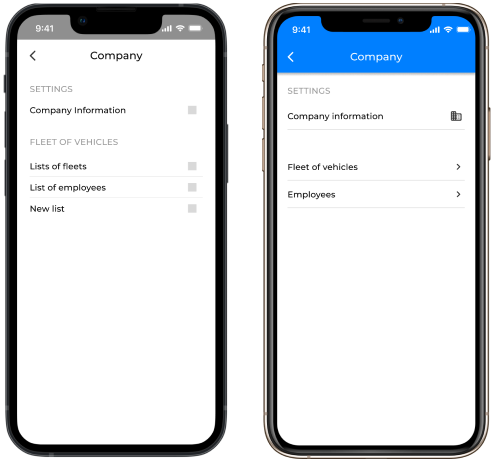
ProblemFleet lists and employee lists on the same screen confused users.
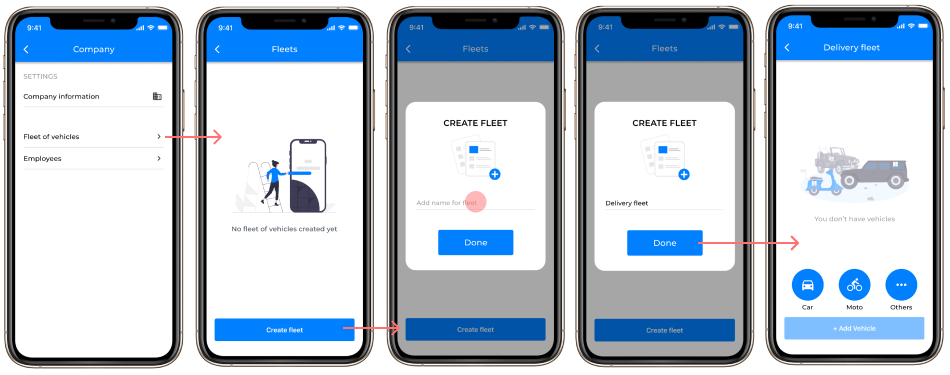
ChangeNew lists are created directly inside the fleet of vehicles.
In mid-fi, once you click on the company, you can see the lists of fleets and employees and you can create a new list.
Users found this confusing, so I added the option to create a new list inside the fleet of vehicles, which worked well.
VEHICLES available
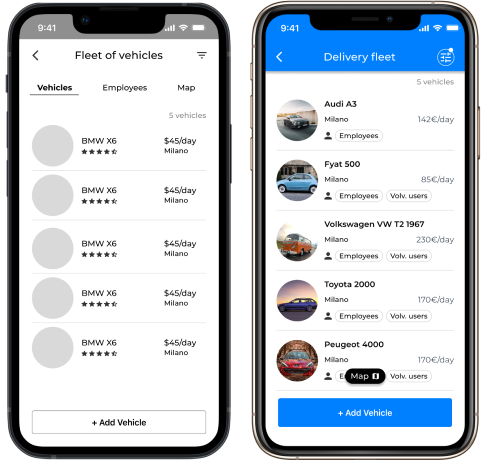
ProblemVehicles, employees and the map competed on one page.
ChangeVehicles come first; the map moved below and employees moved to the company page.
In mid-fi, the fleet page showed your vehicles, employees and the map together.
In testing, users told me the vehicles were the most important part, so I moved the map below and the employees to the company page.
employees available for the list
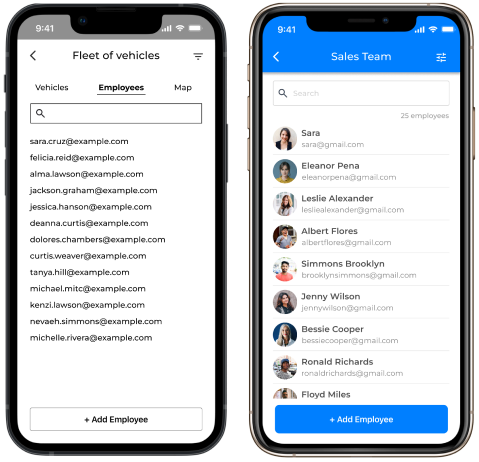
ProblemEmployees only appeared as emails inside a tab.
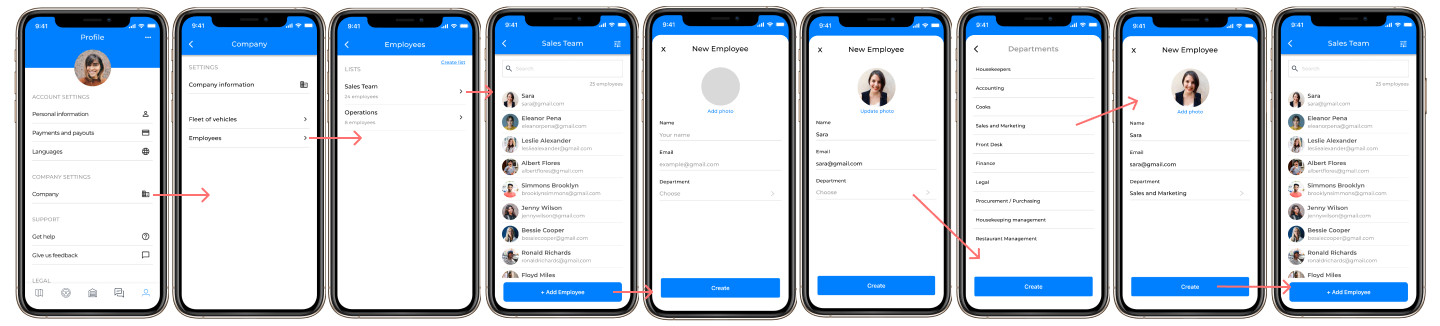
ChangeA dedicated screen to see and manage the employee list.
Before, you could only see the employees’ emails in a tab on the fleet screen. Now there is a screen to see and manage the employee list, with the name and an optional profile picture.
process of add vehicle
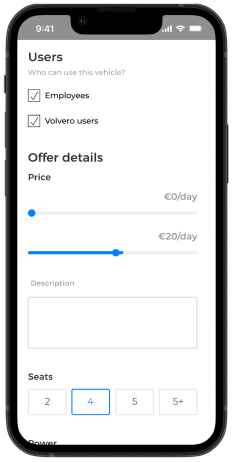
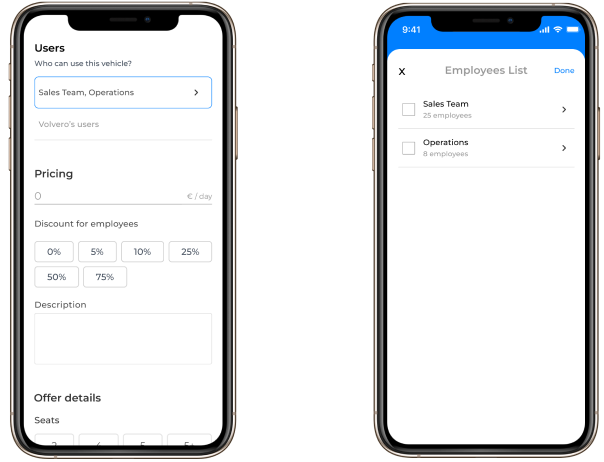
When you create a vehicle, you choose who can use it: employees and/or Volvero users. This is still possible, but now it’s more customizable.
When you click Who can use this vehicle, you can choose employee lists, and open a list to pick specific employees.
Before, you could set different prices for employees and Volvero users.
Now there is one price for everyone, and employees can get a discount.
Final product
Create an employee from an existing list
Create a fleet
Add vehicle
filtering