
“I don’t care who is cheapest, I need whatever can deliver today”
Delivery time and stock availability matter more than price for urgent jobs.

Designing a marketplace integrated into Cafler's B2B SaaS to help workshops find products, check supplier availability and purchase faster.
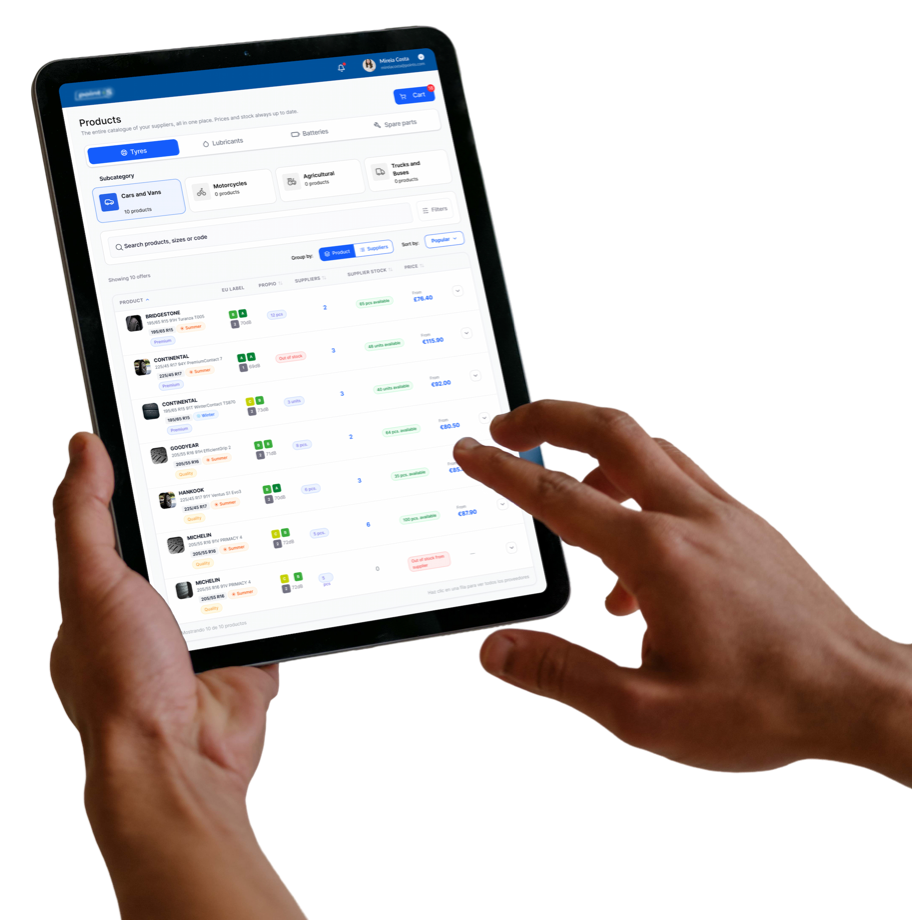
Automotive workshops buy products every day, but they often have to use different supplier platforms to find and purchase them.
During research, we found that workshops had different ways of buying. Some users compared suppliers to find the best option, while others already had a trusted supplier and wanted to buy directly.
The challenge was to create a simple marketplace that could support both behaviours, making it easier for workshops to find products, check availability and complete a purchase.
 Help workshops find products fasterLet users compare suppliers when neededLet users buy directly from a trusted supplierMake order management easierMake stock availability clearCreate a scalable experience for different brands
Key insights from workshops
Delivery time and stock availability matter more than price for urgent jobs.
Many workshops have trusted suppliers and want to buy fast without comparing.
Stock visibility across suppliers must be immediate and easy to understand.
At first, we thought the main problem was comparing prices. However, research showed that workshops had two very different ways of buying.
Don’t want to compare. Want to buy as quickly as possible.
Need stock, price and delivery before deciding.
Key insights from workshops
Each decision supports one of the two buying behaviours: comparison tools for Behaviour B and a faster path for Behaviour A.
Decision 1
BEHAVIOUR A + BFind the right product faster
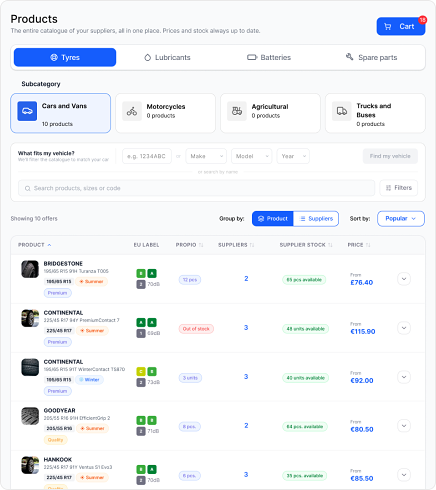
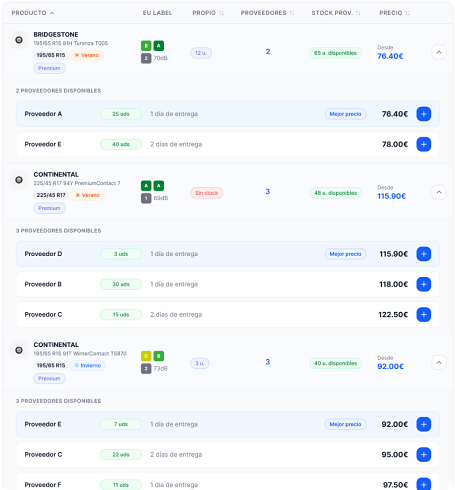
Each catalog row shows the key information at a glance: reference, brand, price, stock and available suppliers. Filters are easy to remove without opening new screens or reloading the page.
Fewer steps to find a product
Decision 2
BEHAVIOUR BCompare without leaving the catalog
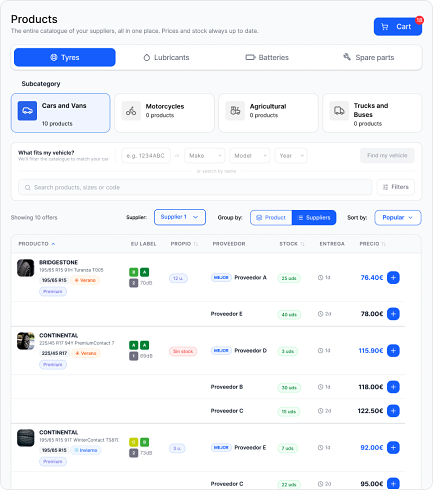
Users can compare price, stock and delivery time directly in the catalog. Grouping the information by supplier makes the key differences easier to see without opening new tabs.
Users stopped opening external tabs
Decision 3
BEHAVIOUR A + BFull comparison, only when needed
Showing every supplier for every product created too much information at once. The full comparison is only shown when the user asks for it, keeping the catalog clean while still making comparison one click away.
Cleaner catalog, less noise
Decision 4
BEHAVIOUR AMake the choice clear before adding to cart
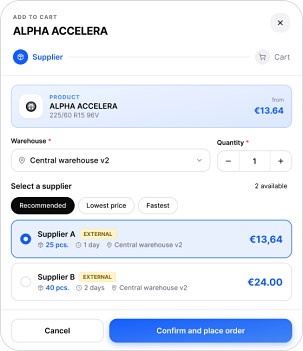
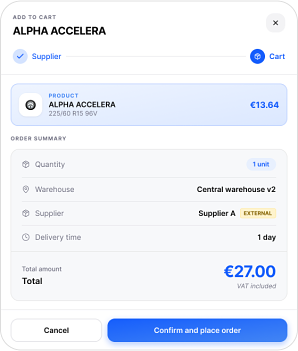
When adding a product to the cart, users choose the supplier, adjust the quantity and see the subtotal before confirming.
This makes the supplier choice clear before the order is placed and helps avoid changes later.
Fewer order changes after confirming
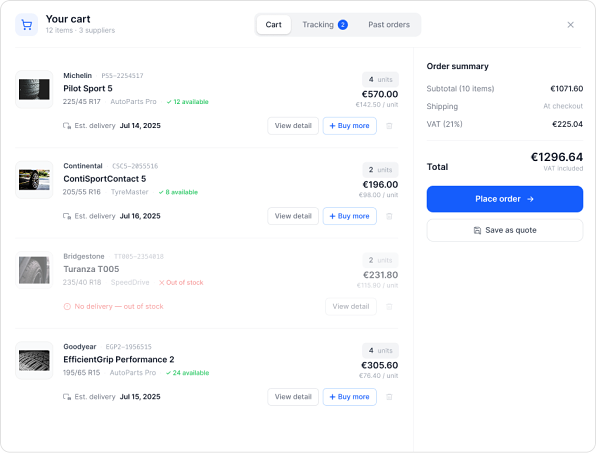
From cart to reorder in just a few clicks.
Products are grouped by supplier with shipping costs calculated for each one.
The total price is always visible on the side.
Every order is tracked in real time, from the moment it’s confirmed until it’s delivered.
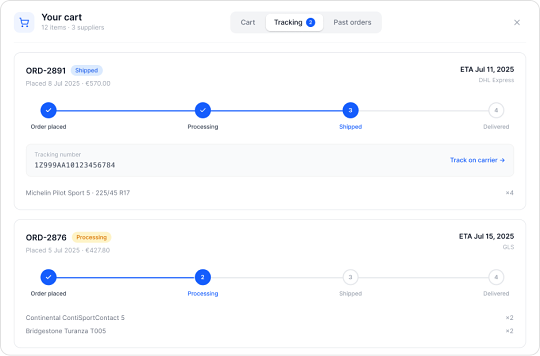
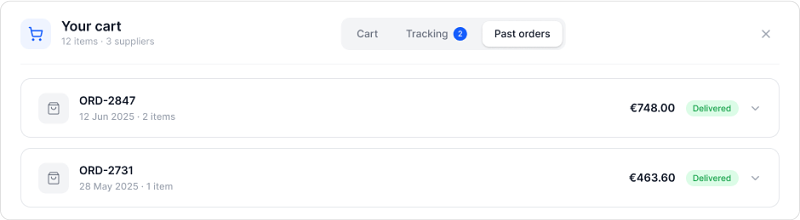
Reorder products in one click. Ideal for workshops that buy the same items every week. If the product is still in stock, users add it again to the cart without searching.
What changed for workshops
Fewer steps and less need to contact suppliers.
Stock, price and delivery time are visible before choosing a supplier.
The supplier and quantity are confirmed before adding the product to the cart.
Workshops can buy, track orders and reorder from the same place.